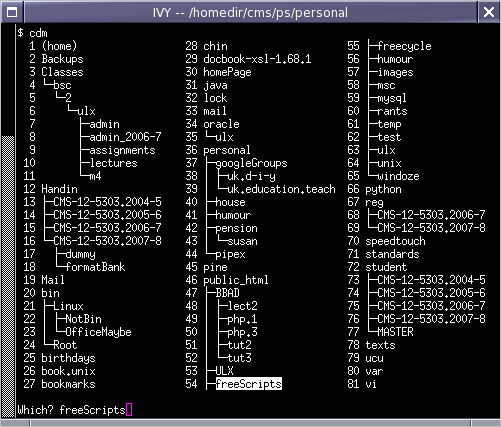
and lets you choose the directory you want. (In the screenshot, the reply has been copied -- not typed!) Directories can be omitted from the menu, or added, by setting up a few hidden files.
cdm -- cd from menu
SFTPget -- file transfer
jpegMv -- rename photos to date and time
All the programs on this page contain the following license:
Copyright (C) 2008 Peter Scott - p.scott@shu.ac.uk This program is free software: you can redistribute it and/or modify it under the terms of the GNU General Public License as published by the Free Software Foundation, either version 3 of the License, or (at your option) any later version. This program is distributed in the hope that it will be useful, but WITHOUT ANY WARRANTY; without even the implied warranty of MERCHANTABILITY or FITNESS FOR A PARTICULAR PURPOSE. See the GNU General Public License for more details. You should have received a copy of the GNU General Public License along with this program. If not, see <http://www.gnu.org/licenses/>.
By downloading a script you are accepting the terms of the GNU General Public License for the script.
The scripts often contain tabs or other odd characters so they can NOT be pasted. You have to do a "save link target as" to a directory on your PATH and make the script executable. Or, avoiding browser cache problems, use wget and the URL.
cdm.sh displays a menu like this:
and lets you choose the directory you want.
(In the screenshot, the reply has been copied -- not typed!)
Directories can be omitted from the menu, or added, by setting
up a few hidden files.
SFTPget, SFTPput and SFTPcmp work, as they are, with SSH.com and password-free logins. However, they contain my login code and the names of the machines I use (home and office). All three scripts need parameterising. Until I get round to that, you might like to edit them to use your login code and machine names.
They need very minor modifications, which I have lost, to work with Open-SSH. The modifications are: taking out the "binary" command and changing the case of some of the options. If someone lets me know what the mods are, I will publish Open-SSH versions. Of course the best thing would be to detect the SSH version and have three scripts instead of six.
jpegMv and jpegMvTime use jpegDate and jpegTime to rename a collection of jpeg files to names like 2005-10-13.jpg or 2005-10-13+15-15-46.jpg. They are particularly useful when merging many photos into one directory. They all use the identify command from ImageMagic. Time should be an option rather than a separate command. Perhaps you would like to do that?

 Last updated: Monday, 08-Sep-2008 21:04:23 BST