This simple tutorial will show you how to boot your Ubuntu system directly into command line (text mode or console). If you just want a console for temporary use, press Ctrl+Alt+F1 on keyboard will switch your desktop to tty1.
Update: Thanks to August Karlstrom, before getting started, make a backup by running the command below:
sudo cp -n /etc/default/grub /etc/default/grub.orig
If for some reason you want to revert to original settings, just run command below in terminal:
sudo mv /etc/default/grub.orig /etc/default/grub && sudo update-grub
To get started, press Ctrl+Alt+T to open terminal. When it opens, follow the below steps:
1. Copy and paste below command into terminal and hit enter:
sudo gedit /etc/default/grub
This opens Grub boot loader config file with text editor.
2. Do below changes:
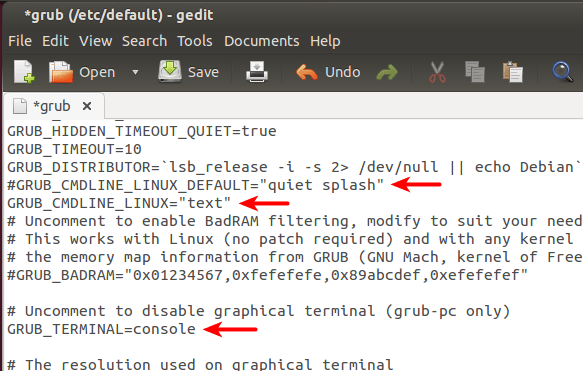
- Comment the line GRUB_CMDLINE_LINUX_DEFAULT=”quiet splash”, by adding # at the beginning, which will disable the Ubuntu purple screen.
- Change GRUB_CMDLINE_LINUX=”" to GRUB_CMDLINE_LINUX=”text”, this makes Ubuntu boot directly into Text Mode.
- Uncomment this line #GRUB_TERMINAL=console, by removing the # at the beginning, this makes Grub Menu into real black & white Text Mode (without background image)
3. After saved the changes, update grub via command:
sudo update-grub
Restart your computer and see the result.


Worked great in Linux Mint 16. Thank you!!!
I always make a backup of any system wide configuration file before editing it, in this case:
cp -n /etc/default/grub /etc/default/grub.orig.
It is very useful to be able to restore the original file in case something goes wrong. It is also nice to be able to get a list of all edited files with `locate *.orig`.
sorry:
message: /usr/sbin/grub-probe: error failed to get canonical path of ‘/cow’.
cow is correct :-)
HI
Wanted my Linux mint to boot in to text mode and it worked thank you very much.
Thanks it works (on lubuntu) ! ^^
But after when I want to launch the GUI doing startx, it doesn’t work…
Any Ideas ?
Try:
and switch to gui by Ctrl+Alt+F7
It works for me with just sudo service lightdm start (I’m not sure I’m good using sudo)
thanks bro.
I am installing Lubuntu 14.01. But I cant access the GUI.
try sudo chown -R yourusername:yourusername /path/to/yourusername
sudo reboot
How the do I get back to being able to use the GUI??? all sorts of problems trying to get back to the way it was.
i had the same problem in ubuntu 14.04. I tried all the ttys and finally reached the gui in tty7
i did ctrl + alt + f7
try the function (F) keys in succession
So how do you do it when your machine boots with uboot, not grub?
WIll this work for ubuntu 12.04
Unfortunately, it didn’t work in my circumstance.
My operation system is Ubuntu 15.04 in Virtualbox.
Even though I have modified the grub file and update grub, it constantly boots into the desktop mode.
Anyone can help me on it?
this is correct.. its a known bug in 15.04.
I found a solution booting up Ubuntu 15.04 into console mode.
As suggested here:
After you fixed the grub file and run update-grub execute:
sudo systemctl set-default multi-user.target